HP Sprocket Studio Plus Review: Portable Photo Printer Performance and Quality
Do you want crisp, clear photos straight from your phone? The HP Sprocket Studio Plus might be your new best friend. This little printer uses dye-sublimation technology to create 4×6 inch borderless prints that look amazing.
Unlike regular Zink printers, this device gives you true photo lab quality. Colors pop. Details stay sharp. Your memories stay vibrant for years, with no fading in sight.
We tested this printer to see if it lives up to the hype. It connects wirelessly to your phone through an easy to use app. You can edit photos before printing them, adding a fun personal touch.
But is it really worth your attention? This review covers everything. We look at build quality, print speed, and real world performance. Let’s see if the Sprocket Studio Plus prints its way into your heart, or falls short on delivery.
In a Nutshell
Here’s the quick rundown on the HP Sprocket Studio Plus. This printer uses dye-sublimation technology instead of Zink. That means your photos get real depth and color accuracy.
- Image quality stands out as the biggest win. Colors look vibrant and prints resist fading over time.
- The companion app lets you edit photos before printing. You can crop, add filters, and personalize each shot.
- Build quality feels solid. The plastic body feels sturdy, not flimsy like cheaper alternatives.
- Print speed is a letdown. Each photo takes longer than you’d expect from a modern printer.
- The paper tray design causes issues. Prints sometimes get pushed off during the printing process.
- Setup uses wireless connectivity, so pairing with your phone stays simple.
This printer works best for people who care more about photo quality than speed. If you want lab quality prints at home, this device delivers. Just know the tray quirks and slower pace exist before you commit.
Print Quality and Image Output
The dye-sublimation technology inside this printer is what separates it from cheaper alternatives. This method heats special dyes and transfers them directly onto the photo paper. The result? Colors stay vibrant and true to life.
Your photos won’t look washed out or dull. The reds stay red. The blues stay blue. Skin tones come through naturally without weird color shifts. This matters when you’re printing memories that matter to you.
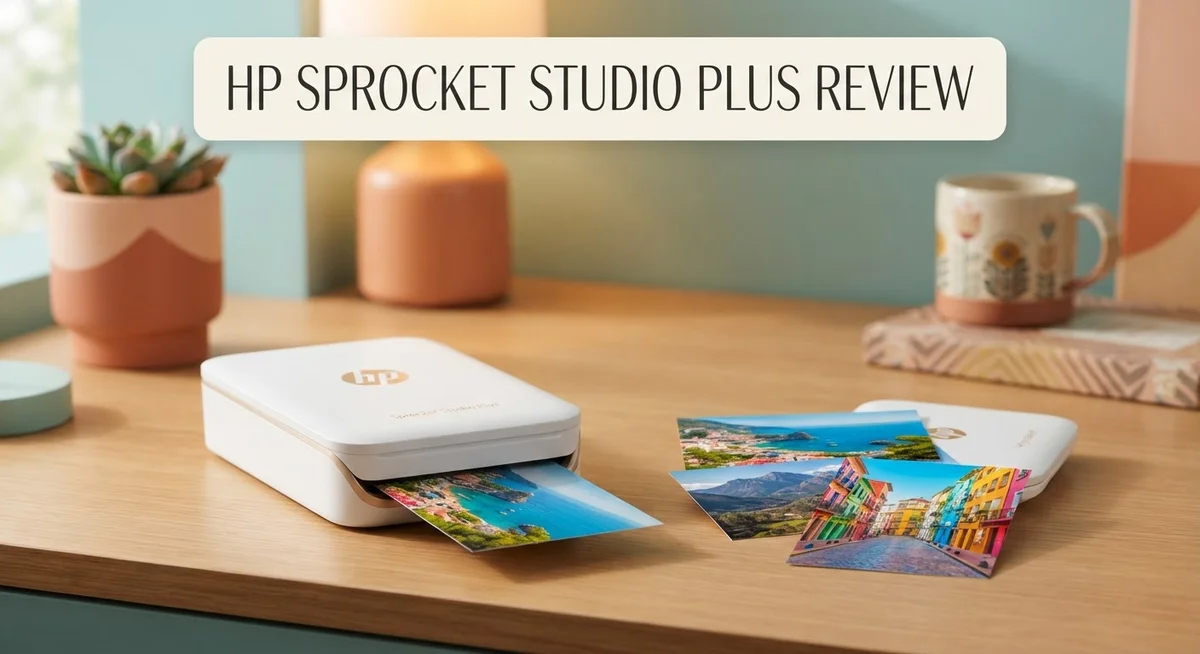
The 4×6 inch borderless format gives you a professional finish. No white edges cut into your image. The entire photo stretches edge to edge, just like prints from a real photo lab. That’s a feature many home printers can’t match.
One thing that impressed us was the color accuracy across different lighting conditions. Whether you’re printing a sunset photo or an indoor portrait, the printer handles the color transitions smoothly. Gradients don’t show banding or weird stripes. Dark areas stay detailed without turning into black blobs.
The prints themselves feel substantial. The photo paper has a slight gloss that brings out detail. Your fingers won’t smudge the images either. The ink bonds permanently to the paper, so these photos won’t fade if you leave them on a shelf or in a photo album for years.
The app’s editing tools help you get the best output possible. You can adjust brightness, contrast, and saturation before sending anything to print. This means you have control over how your final image looks. No surprises when the print comes out.
One realistic note: the print speed does affect your workflow. Each photo takes several minutes. If you’re printing a stack of vacation photos, you’ll wait a while. But when you see the quality of each individual print, many users feel the wait is worth it.
The borderless output and color fidelity make this printer shine for anyone who values photo quality over convenience. If you want lab-grade prints from your phone, this device delivers on that promise.

- PHOTOS MADE TO LAST – Print quality photos that will last for years on tear-resistant, smudge-proof, waterproof...
- CUSTOMIZE YOUR CREATIONS – Add your own style to each photo by decorate it with stickers, frames, filters, and...
- INSTANT PRINTING – Designed for efficiency and convenience, this printer will produce dry-to-the-touch 4x...

Last update on 2026-10-04 / Affiliate links / Images from Amazon Product Advertising API
Design, Build, and Paper Handling
The HP Sprocket Studio Plus feels solid in your hands. The device uses high quality plastic construction throughout. You’ll notice the printer has a compact footprint, making it easy to place on a desk or shelf.
The physical design prioritizes simplicity. The front panel features an intuitive button layout. The wireless connectivity means no cables clutter your workspace. You control everything through the mobile app on your phone.
Now let’s talk about the paper tray. This is where the design shows some weakness. The tray mechanism has a notable flaw: printed photos tend to slide or push off as they exit. You need to catch them quickly or they’ll fall to the ground. This poor tray design frustrates users who expect a smoother output experience. It’s a practical issue that affects daily use.
The printer handles 4×6 inch photo paper exclusively. The dye sublimation system produces crisp, vibrant output on this standard size. Paper feeds smoothly into the device, and the printing process itself runs quietly. The borderless printing capability means your photos extend edge to edge with no white margins.
The build quality extends to durability. Your prints emerge with a substantial feel that distinguishes them from cheaper alternatives. The photos resist fading over time. This longevity matters if you plan to display or share your prints.
The overall construction reflects a premium approach. The device weighs enough to feel sturdy without being bulky. The plastic materials don’t feel cheap or hollow. You can tell HP invested in making this printer last.
One design limitation to mention: the printer isn’t portable like some competitors. It needs a stable surface and a power outlet. If you want to print photos at parties or outdoor events, this isn’t your solution.
The design philosophy here emphasizes photo quality over portability. The tray issue remains the main structural complaint. Beyond that flaw, the build quality justifies the engineering choices HP made for superior image output.
Wireless Connectivity and Mobile App Integration
The HP Sprocket Studio Plus connects to your phone through wireless technology. You don’t need cables or complex setup steps. The printer pairs with both iOS and Android devices instantly.
The companion app forms the core of this printer’s experience. You control everything from your smartphone. The app lets you browse photos stored on your device. You can also access cloud services directly through the interface.
Photo editing happens before printing. The app includes tools to adjust brightness, contrast, and saturation. You can crop images to fit the 4×6 inch format perfectly. Color correction features help you get the output you want. These editing options save time compared to using separate software.
The wireless connection stays stable during printing. You won’t experience dropouts or connection failures. The printer maintains its link even when your phone moves around the room. This reliability matters when you’re printing multiple photos in a session.
The app interface feels intuitive. New users navigate it without confusion. Icons are clear. Buttons respond quickly. The layout organizes functions logically. You find what you need fast.
Mobile integration removes friction from your workflow. Photos from your camera roll print directly. You don’t transfer files to a computer first. Social media images print straight from apps. This streamlined approach appeals to people who want instant physical copies.
The app also stores your print history. You see what you’ve printed before. This feature helps you remember which photos worked best. You can reprint favorites without hunting through your phone’s gallery.
One practical note: the wireless range extends throughout most homes. You can print from different rooms. The printer doesn’t require line of sight to your phone. This flexibility matters for casual home use.
The connection security protects your photos. Data transfers use encryption. Your images don’t get exposed to network risks. This protection gives you peace of mind when printing personal photos.
The mobile app integration truly sets this printer apart. It transforms photo printing from a technical task into something simple and enjoyable. You stay in control throughout the entire process.
Top 3 Alternatives
Fujifilm Instax Share SP-3

- 🏃 [HI-SPEED SUPPORT] BoxWave Cable Compatible With Fujifilm Instax Share SP-3. Supports Hi-Speed USB 2.0 DATA...
- 💰 [LOW COST] Why pay more? Get the DirectSync Cable for your device that functions just as well OR BETTER than...
- ✌ [DUAL-FUNCTION] The DirectSync cable SYNCS and CHARGES your device. The DirectSync's dual-function design makes...
Last update on 2026-10-04 / Affiliate links / Images from Amazon Product Advertising API
The Fujifilm Instax Share SP-3 brings instant printing straight from your smartphone. This printer connects via Wi-Fi to your phone, letting you print photos in seconds. The prints come out in classic Instax size, perfect for scrapbooks and memories.
Key features include wireless connectivity and simple app controls. You get vibrant colors and sharp details on every print. The SP-3 handles photos from your phone’s gallery or social media apps with ease.
Canon Selphy CP1500

- Complete Photo Printing Bundle Everything you need in one kit: Canon Selphy CP printer, KP-108 photo paper...
- Lab-Quality Prints at Home Dye-sublimation technology delivers vibrant, professional-quality 4x6 photos that are...
- Wireless & Compact Design Easily print from your smartphone, tablet, or computer via Wi-Fi. Compact and portable...
Last update on 2026-10-04 / Affiliate links / Images from Amazon Product Advertising API
Canon’s Selphy CP1500 offers compact, portable printing for on-the-go moments. This printer uses dye-sublimation technology to produce lab-quality photos. You can print directly from cameras, memory cards, or mobile devices.
The compact design makes it ideal for events and travel. Print speeds are fast, and the output quality stays consistent across every photo. The CP1500 gives you professional results without needing a computer.
Polaroid Hi-Print

- Sticky Photos: Features sticky-back photo paper with a matte finish, allowing for easy application to various...
- Compact Size: Each sheet measures 2.1 x 3.4 inches (54 x 86 mm), designed to fit conveniently in a pocket.
- Quick Printing: Photos print in less than 60 seconds, offering fast results for immediate use.
Last update on 2026-10-04 / Affiliate links / Images from Amazon Product Advertising API
Polaroid’s Hi-Print brings back the instant photo experience with modern tech. This printer works wirelessly with your phone to create credit-card-sized prints. The images have that classic Polaroid aesthetic everyone loves.
Setup is straightforward—just download the app and connect via Bluetooth. The Hi-Print produces vibrant colors and instant gratification. It’s perfect for parties, events, and creating physical memories from digital photos. The prints dry instantly, so you can share them right away.
Each option offers different benefits depending on your needs. The Instax Share SP-3 excels at classic instant sizes. The Canon Selphy CP1500 provides professional quality. The Polaroid Hi-Print delivers nostalgic appeal with modern convenience.
Print Speed and Efficiency
The HP Sprocket Studio Plus uses dye-sublimation technology to create prints that outperform standard alternatives. This method produces vibrant colors and sharp details that stay vivid over time.
Print speed is where this printer shows its main limitation. The device prints slower than many competitors in its category. If you need photos quickly, this printer requires patience. Each 4×6 inch photo takes several minutes from tap to finished print.
However, speed isn’t everything. The slower printing process actually works in this printer’s favor for quality. The dye-sublimation method needs time to heat and transfer ink onto photo paper. Rushing this process would compromise the color depth and clarity you get with this model.
Your workflow matters more than raw speed here. If you print occasionally for social events, parties, or personal albums, the slower pace becomes less noticeable. You’re not waiting for dozens of photos. You’re printing a handful of high-quality images that look professional.
The mobile app integration helps manage your printing efficiency. You can edit photos before sending them to print. This reduces wasted prints from poor composition or color issues. The editing tools let you crop, adjust brightness, and fine-tune results before the printer starts working.
Wireless connectivity means you don’t need cables or computers. Your phone connects directly to the printer. This streamlines your process from capture to print. The stable connection prevents interruptions mid-print.
Think of this printer as quality-focused, not speed-focused. It excels when you prioritize output quality over printing volume. The dye-sublimation technology combined with the mobile app creates a system where fewer, better prints matter more than fast printing.
For people printing 5 to 15 photos per week, the speed feels acceptable. For someone needing 50 photos daily, this printer won’t meet your needs. Match your expectations to your actual printing habits before committing to this device.
Cost Per Print and Long-Term Value
The HP Sprocket Studio Plus operates on a per-print model that requires understanding your actual usage patterns. Each 4×6 inch photo consumes one sheet of specialized dye-sublimation paper. Your total spending depends entirely on how many prints you create each month.
Print frequency matters most here. Someone printing 5 photos weekly spends differently than someone printing 50. The dye-sublimation technology produces lab-quality output, which justifies the paper cost. You’re not paying for a cheap consumable. You’re investing in prints that resist fading and maintain color accuracy for years.
Long-term value emerges when you examine print longevity. These photos last significantly longer than instant film alternatives. A print created today will look vibrant in five years. This durability means you’re not replacing faded photos constantly. The investment compounds positively over time.
Consider your printing purpose. People who create photo albums, display prints at home, or give physical photos as gifts see better value. Occasional printers gain more benefit than heavy users. If you print 10 photos monthly, the per-print cost becomes manageable. If you print 100 photos monthly, costs accumulate faster.
The mobile app integration reduces waste. You edit photos before printing, not after. This means fewer rejected prints. Better editing tools lead to fewer reprints due to color issues or composition problems. Smart printing habits directly reduce your per-print expenses.
Compare this to alternatives. Zink-based printers cost less per print but produce inferior image quality. You might save money upfront but sacrifice lasting value. The HP Sprocket Studio Plus takes the opposite approach. Higher per-print costs deliver superior longevity and visual appeal.
Think of this as quality over quantity. You print fewer photos, but each one matters. The prints deserve framing or gifting. They justify their existence through superior aesthetics. Your wallet feels the impact, but your photo collection gains genuine value.
The real question isn’t whether the per-print cost seems high. The question is whether you value photos worth keeping forever.
Pros and Cons
Pros
- Dye-sublimation prints deliver superior color quality and sharpness compared to Zink alternatives
- Photos resist fading and maintain vibrant colors over time
- The mobile app lets you edit photos before printing, reducing waste
- Sturdy plastic construction feels durable and reliable
- Wireless connectivity works seamlessly throughout your home without cables
Cons
- Print speed moves slowly, taking longer per photo than competing models
- The paper tray design has a flaw that sometimes pushes finished prints off during output
- Per-print costs add up quickly if you print frequently
- Limited practical design means the overall setup feels basic for the category
Who Should Buy It
The HP Sprocket Studio Plus works best for people who care about photo quality above all else. You’re the ideal buyer if you print occasionally and want images that stay vibrant for years.
Social media enthusiasts benefit greatly from this printer. You can edit photos directly in the mobile app before printing. This means you customize every shot and reduce wasted paper. The wireless connection lets you print from anywhere in your home without plugging in cables.
Memory makers and event planners find real value here. You print photos for parties, weddings, or personal albums. Each photo matters because you’re creating keepsakes. The dye-sublimation prints resist fading, so your memories stay sharp and colorful over time.
Casual home users who print 5 to 15 photos weekly will feel satisfied. The slow print speed doesn’t bother you if you’re not rushing. You appreciate that each image comes out crisp and clear. The sturdy plastic construction gives you confidence the device will last.
Photography enthusiasts who want portable printing appreciate the quality output. The 4×6″ borderless format works perfectly for displaying photos or sharing physical prints. You understand that superior color reproduction matters more than speed.
This printer is not ideal for high-volume printing. If you print 50 photos weekly, the per-print costs will frustrate you. The slow speed becomes annoying when you’re processing large batches.
Professional photographers seeking rapid output should look elsewhere. You need faster throughput and different features. This device feels too basic for your workflow.
Budget conscious buyers who print frequently might reconsider. The per-print model adds up quickly with regular use. You’ll want to calculate your actual printing habits first.
The HP Sprocket Studio Plus shines when you value quality, convenience, and occasional printing. You’re willing to wait for each photo because you know it will look fantastic. The mobile app integration and wireless connectivity fit your lifestyle perfectly. This printer rewards thoughtful, intentional printing rather than rapid output.
Final Verdict
The HP Sprocket Studio Plus earns its place as a solid choice for anyone who treasures printed memories. It blends sharp image output with a simple wireless setup that fits modern lifestyles.
This printer rewards patience. Each print takes time, but the result feels worth the wait when colors stay true and details stay crisp.
Think about how you actually use photos. If you print to hold special moments, this device delivers real satisfaction every time.
The build quality tells its own story. A sturdy plastic shell signals that HP built this for repeated use, not a one time gimmick.
Still, some design choices hold it back. The tray issue and slower output remind you this isn’t built for speed or heavy daily use.
If you want a printer that turns phone photos into keepsakes, this one fits that role well. It suits people who print occasionally but care deeply about quality.
For families, the printer works great during holidays, birthdays, or weekend gatherings. You get printed memories without juggling a computer or external software.
Gift givers will also appreciate this option. It offers a thoughtful present for anyone who loves photography or scrapbooking.
Before buying, ask yourself one simple question. Do you print often, or do you print for meaning?
If meaning wins, this printer suits you perfectly. If frequency wins, you might want a faster, high volume alternative instead.
In short, the HP Sprocket Studio Plus performs best as a quality focused companion, not a bulk printing machine. It fits users who print selectively and value lasting results.
Overall, this is a printer built for moments, not masses. If that matches your printing habits, it delivers consistent satisfaction every single time you use it.
Frequently Asked Questions
Does the HP Sprocket Studio Plus print faster than other photo printers?
No. This printer has a slow print speed compared to competitors in the category. Each photo takes longer to produce than similar models. If you need quick output for high-volume printing, you may feel frustrated waiting between shots. However, the slower pace comes with a benefit: superior image quality that Zink printers cannot match.
What photo quality should I expect?
Expect crisp, clear color output with long-lasting results. The dye-sublimation technology produces vibrant prints that resist fading over time. Your phone photos transform into keepsakes worth keeping. This quality level stands well above basic Zink alternatives, making it ideal if you care about how your printed memories look years later.
Is the paper tray design reliable?
The paper tray has a known flaw. Finished prints sometimes get pushed off during the output process. This design issue frustrates users who want a seamless printing experience. You’ll need to monitor prints as they emerge to prevent them from falling. It’s a practical limitation worth considering before purchase.
Who should buy this printer?
This printer works best for social media enthusiasts, memory makers, and photography fans who print occasionally. Families enjoy it during holidays and gatherings. Gift givers appreciate the quality output. The printer suits people who print 5 to 15 photos weekly and value quality over speed.
Who should avoid this printer?
Skip this model if you print frequently or need rapid output. Professional photographers seeking fast production should look elsewhere. High-volume users will feel frustrated by the slow pace and ongoing costs.

Sili is a tech reviewer who cuts through the hype to find AI tools and gadgets that make life easier. She shares honest reviews and simple guides for everyday tech users.