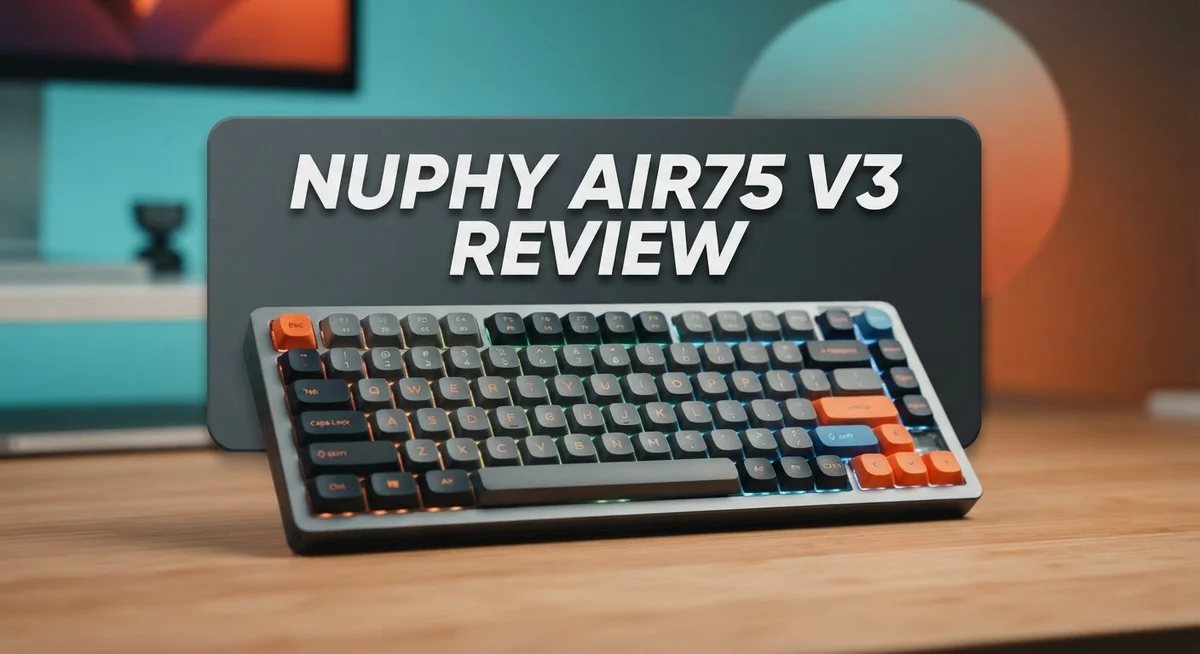
NuPhy Air75 V3 Review: Compact Mechanical Keyboard Worth It?
Looking for a keyboard that mixes style with real typing comfort? The NuPhy Air75 V3 might be your answer.
This 75% compact keyboard packs 68 keys into a sleek aluminum frame. It feels sturdy, yet stays light enough to carry anywhere.
Typing on this board feels crisp and responsive. Each keystroke gives a satisfying “thock” sound that typing fans love.
The hot-swappable switches let you customize your feel without any soldering. You can connect through 2.4GHz, Bluetooth 5.0, or USB-C wired mode.
NuPhy also built a simple web app for tweaking settings. It works smoothly on both Mac and Windows systems.
With a 1200-hour battery claim and a 3-stage kickstand, this keyboard aims to fit daily work and gaming needs alike.
Let’s explore what makes the Air75 V3 stand out from its competitors.
In a Nutshell
Here’s a quick rundown of what you need to know about the NuPhy Air75 V3 before you decide.
-
Connectivity options include 2.4GHz wireless, USB-C wired, and Bluetooth 5.0. You get flexibility for any setup.
-
The keyboard delivers a satisfying “thock” sound with each keypress. Typing feels fun and premium.
-
It works smoothly with both Mac and Windows systems. You won’t face compatibility headaches.
-
Switch travel sits at 3.5mm on Red and Brown variants. Some users may want deeper travel.
-
The knobs on this board show quality issues in user reports. This is a notable drawback.
-
This keyboard weighs more than some rivals, like the Keychron K8 Pro. Portability takes a small hit here.
-
Compared to competitors like IQUNIX Magi65 and LoFree Flow Lite 84, the Air75 V3 holds its own with hot-swap features and strong build quality.
Overall, the Air75 V3 brings solid performance with a few rough edges. It’s a strong pick if sound and feel matter most to you.
Key Features and Specifications
The NuPhy Air75 V3 brings together a compact form factor with practical features that appeal to both office workers and gaming enthusiasts. This keyboard combines portability with solid performance across multiple connection methods.
Build and Layout
The 68-key design fits into a 75% compact layout. You get a full row of function keys, arrow keys, and essential navigation buttons without the bulk of a full-size board. The aluminum frame provides durability while keeping weight reasonable for travel. A 3-stage adjustable kickstand lets you find your preferred typing angle, whether you prefer flat or elevated positions.
Switch Technology
Low-profile 3.0 mechanical switches power this keyboard. Each keypress delivers a crisp, responsive feel that users describe as satisfying. The switch travel measures 3.5mm on Red and Brown variants, offering quick actuation for fast typists. Hot-swappable sockets mean you can swap switches without soldering, giving you freedom to experiment with different switch types and sounds.
Connectivity Options
You get three ways to connect. The 2.4GHz wireless connection provides lag-free performance for gaming and typing. Bluetooth 5.0 works smoothly when you need to pair with multiple devices. A USB-C wired option keeps you connected during extended sessions without worrying about battery drain.
Battery and Power
NuPhy claims this keyboard runs for 1200 hours on a single charge. This extended battery life means you won’t need to charge frequently during typical daily use.
Software and Customization
The web-based NuPhy.io software handles all customization. Users praise this interface for being intuitive and easy to navigate. You can remap keys, adjust RGB lighting, and fine-tune performance without installing desktop software.
Compatibility
The Air75 V3 works seamlessly with both Mac and Windows systems. This cross-platform support makes it ideal if you switch between different operating systems throughout your day.
No products found.
Design and Build Quality
The aluminum frame gives the Air75 V3 a premium feel in your hands. NuPhy chose materials that balance durability with weight, making this keyboard portable without feeling cheap or flimsy.
The 75% compact layout sits perfectly between full-size and ultra-portable boards. You get 68 keys arranged efficiently, so you don’t sacrifice arrow keys or function rows. This size works well on cramped desks or when you travel frequently.
The build quality shines in most areas. The switches snap into hot-swap sockets smoothly, and you can swap them out anytime without tools or soldering skills. This modular approach means you can experiment with different switch types to find your ideal feel.
The 3-stage adjustable kickstand deserves attention here. You can tilt the keyboard at different angles to match your typing posture. This flexibility helps reduce wrist strain during long work sessions or gaming marathons.
However, the knobs present a weak point in the design. Users report that these controls feel loose or develop issues quickly. If you plan to use the knobs regularly, expect them to disappoint over time. This is a notable flaw in an otherwise solid build.
The low-profile 3.0 mechanical switches keep the overall height down. This makes the keyboard feel sleek and modern on your desk. The compact profile also means less hand travel, which some typists prefer for speed.
The frame construction handles daily use well. The aluminum doesn’t bend or creak under normal typing pressure. The keyboard maintains its structural integrity even after months of regular use, which speaks to NuPhy’s manufacturing standards.
One trade-off exists here: the keyboard weighs more than some competitors like the Keychron K8 Pro. If you move your keyboard constantly, you might notice the extra weight. For stationary setups, this rarely becomes an issue.
Overall, the design and build quality deliver what most users expect from a modern mechanical keyboard. The hot-swap capability and adjustable stand add practical value. The weak knobs are the main concern, but they don’t affect core typing performance.
Typing Performance and Switch Quality
The Air75 V3 puts responsive typing front and center. When you press a key, the low-profile 3.0 mechanical switches snap back with crisp feedback. Users consistently praise the satisfying keystroke feel across different tasks, whether you’re typing emails or coding.
The switch quality here matters because it affects your daily experience. The Red and Brown variants offer 3.5mm of travel distance. This is shorter than traditional mechanical switches, but the design keeps the keyboard slim and portable. The switches feel snappy at 2.4GHz wireless speed, with minimal lag between your keypress and the screen response.
What makes typing smooth is the hot-swappable design. You can swap switches without soldering or tools. This means you can test different switch types to find what feels best for your hands. Some users prefer linear switches for gaming. Others want tactile feedback for writing. The Air75 V3 lets you experiment without commitment.
The typing experience shines most at 2.4GHz connectivity. Wireless latency stays imperceptible during normal use. Your fingers won’t feel delayed or sluggish. This matters more than people realize. A keyboard with lag creates friction in your workflow and causes fatigue over long sessions.
One consideration exists here: switch quality varies by variant. The Red switches deliver a smooth, linear feel. The Brown switches add a subtle bump for tactile response. Both options perform well, but your preference depends on your typing style and use case.
The aluminum frame contributes to typing stability too. It doesn’t flex or wobble when you press keys hard. This solid foundation helps each keystroke feel intentional and controlled. The 3-stage adjustable kickstand also plays a role. You can angle the keyboard to match your desk height and wrist position. Better ergonomics mean less strain during long typing sessions.
Overall, the Air75 V3 delivers reliable, enjoyable typing performance. The switch quality remains consistent. The wireless connection stays responsive. The build feels sturdy beneath your fingers. These elements combine to create a keyboard that feels good to type on, day after day.
Top 3 Alternatives
Keychron Q3 Pro

- Upgraded Wireless Full Metal Keyboard: The Q3 Max combines advanced 2.4 GHz wireless, Bluetooth, and Type-C wired...
- 2.4 GHz & Bluetooth: Enhanced performance with the seamless 2.4 GHz wireless connection and a rapid 1000 Hz polling...
- Remap with Keychron web app: Simply connect the Q3 Max to your device with a cable, open the Keychron Launcher web...
Last update on 2026-10-04 / Affiliate links / Images from Amazon Product Advertising API
The Keychron Q3 Pro offers a compact 75% layout that fits perfectly on smaller desks. This keyboard features hot-swappable switches, so you can change them whenever you want. The build quality feels solid and premium. You get wireless connectivity with Bluetooth or USB-C cable options. The battery lasts for weeks on a single charge. RGB lighting customization is available through the software. Typing experience is smooth and responsive. Many users appreciate the aluminum frame construction.
Ducky One 3

- DKON2108ST-CUSPDCLAWSC1
Last update on 2026-10-04 / Affiliate links / Images from Amazon Product Advertising API
Ducky One 3 brings a full-size design with excellent build quality from a trusted manufacturer. The keyboard includes PBT double-shot keycaps that resist shine over time. You get mechanical switches in various options depending on your preference. The stabilizers feel smooth and don’t rattle. RGB lighting is vibrant and customizable. The keyboard connects via USB-C cable only. Typing feedback is crisp and satisfying. This keyboard appeals to users who want reliability and durability.
Varmilo VA87M

- Wired, mechanical office keyboard with anodized metal plate: Equipped with our improved CHERRY MX2A switches...
- CHERRY MX2A SILENT RED switches: Smooth and quiet typing feel with linear switching characteristics (no click) and...
- Practical: Tasteful white status LEDs in the CAPS LOCK, SCROLL LOCK, and NUM LOCK keys, as well as 4 additional...
Last update on 2026-10-04 / Affiliate links / Images from Amazon Product Advertising API
The Varmilo VA87M delivers a TKL (tenkeyless) form factor perfect for balanced desk setups. This keyboard features premium construction with a sturdy aluminum case. The switches are hot-swappable, giving you flexibility for customization. Keycaps come in quality PBT material. The stabilizers are pre-tuned for smooth operation. RGB lighting offers nice visual effects. Connection happens through USB-C cable. The typing experience feels refined and professional. Varmilo is known for attention to detail and quality control.
Each of these keyboards presents different size options and features. Choose based on your desk space and preference for wireless versus wired connections.
Connectivity and Battery Life
The NuPhy Air75 V3 offers three connection methods to fit your workflow. You can use the 2.4GHz wireless mode for lag-free typing at your desk. Switch to Bluetooth 5.0 when you need to hop between devices like your phone or tablet. Plug in the USB-C cable for a wired connection whenever you prefer a direct link to your computer.
The 2.4GHz connection stands out as the star here. Users report crisp, responsive typing with zero noticeable delay. This mode works best if you keep your keyboard close to your computer. The wireless range extends far enough for most home and office setups.
Bluetooth 5.0 adds flexibility for remote workers and travelers. You can pair the Air75 V3 with multiple devices and switch between them quickly. The connection stays stable across rooms and even through light obstacles. Battery drain increases slightly with Bluetooth, but you still get solid usage time.
Battery life reaches an impressive 1200 hours per charge on a single set of batteries. That breaks down to roughly 50 days of continuous use, or several months of typical daily typing. The actual runtime depends on your connection mode and how often you use the keyboard.
The 2.4GHz mode consumes more battery than Bluetooth since it maintains a constant wireless link. Wired mode uses no battery at all, making it perfect for extended sessions when you want zero power concerns. Most users find they charge every few months rather than every few weeks.
The keyboard ships with USB-C charging capability built in. You can top up the battery while using the keyboard in wired mode. The charging port sits on the back, so cables stay out of your way during work.
Overall, connectivity options feel practical and well-executed on the Air75 V3. The multiple connection methods let you adapt to different work environments without hassle. Battery performance easily handles real-world use patterns for weeks at a time.
Customization and Software
The NuPhy.io software is where the Air75 V3 truly shines for power users. This web-based platform lets you remap keys, adjust RGB lighting, and fine-tune macros without installing desktop apps. You access it directly from your browser on Mac or Windows.
Key remapping works smoothly here. You can reassign any key to perform a different function. This flexibility helps if you use multiple programs that demand different layouts. The interface shows a visual keyboard map. You click the key you want to change, then select its new function from a dropdown menu.
RGB customization offers plenty of options. You can set static colors, choose from preset animations, or create your own lighting patterns. The software lets you control brightness and speed easily. Most users find the lighting controls intuitive and responsive.
Macro support opens up automation possibilities. Record complex key sequences and assign them to single keys. This feature appeals to gamers, programmers, and anyone doing repetitive typing tasks. The macro editor displays your commands clearly so you can verify each step before saving.
Layer switching is another strong point. You can create multiple keyboard layouts and toggle between them on the fly. This helps if you switch between gaming, coding, and writing throughout your day. Each layer stores its own key mappings and lighting settings independently.
One limitation exists here: the software only works through your web browser. You cannot save profiles directly to the keyboard’s onboard memory for offline use. This means you need internet access to make changes, though the keyboard remembers your last settings even when offline.
The customization experience feels modern and accessible. Even beginners can navigate the software without frustration. Advanced users appreciate the depth of control available. NuPhy regularly updates the platform with new features and improvements based on user feedback.
The hot-swappable switch design pairs perfectly with this software flexibility. You can experiment with different switch types while the software lets you adjust how each switch behaves. This combination makes the Air75 V3 a genuinely personal typing tool that grows with your needs.
Pros and Cons
Pros
- Crisp, responsive typing feel at 2.4GHz connectivity keeps your work flowing smoothly
- Satisfying “thock” sound delivers that premium mechanical keyboard experience
- Hot-swappable switches let you customize or replace them without tools
- Lightweight, portable design fits easily into bags for on-the-go work
- Web-based NuPhy.io software makes key remapping and macros simple for everyone
Cons
- Knobs show poor build quality and may wear quickly with regular use
- Heavier than some competing 75% keyboards if portability matters most to you
- Limited switch travel at 3.5mm on Red and Brown variants feels shallow for some typists
Who Should Buy It
The Air75 V3 works best for specific types of users with particular needs and preferences.
If you switch between devices constantly, this keyboard fits your life. The three connection methods (2.4GHz, Bluetooth 5.0, and wired USB-C) mean you can jump from your laptop to tablet to desktop without hassle. Remote workers and digital nomads will appreciate the flexibility here.
Mechanical keyboard enthusiasts belong in this group too. You get hot-swappable switches, so you can experiment with different switch types without buying new keyboards. The customization software lets you remap keys and create macros. Power users who want complete control over their setup will love this level of personalization.
Content creators and programmers benefit from macro support. You can record complex key sequences and assign them to single buttons. This saves time during repetitive tasks. The responsive 2.4GHz typing feel keeps your workflow smooth and uninterrupted.
Travelers and remote workers appreciate the lightweight, portable design. The keyboard fits easily into laptop bags. Battery life reaches 1200 hours on a charge, so you won’t need to charge constantly while moving between locations.
Mac and Windows users both find compatibility here. The Air75 V3 works seamlessly across both operating systems. Mixed-device households benefit from this universal support.
However, some users should look elsewhere. If you prioritize extreme portability above all else, heavier competitors exist. The switch travel feels shallow at 3.5mm on Red and Brown variants. Typists who prefer deeper key press feedback might feel frustrated.
The knobs have reported quality issues. If you rely on physical knobs for volume control or other functions, consider this limitation carefully. Regular use may cause wear over time.
Budget conscious buyers who avoid customization software won’t maximize this keyboard’s potential. The Air75 V3 shines brightest when you use its software features. If you want a simple plug and play keyboard without customization, other options serve you better.
Ultimately, the Air75 V3 targets users who value connectivity flexibility, customization depth, and portable mechanical typing.
Final Verdict
The NuPhy Air75 V3 earns its spot among top 75% keyboards. It blends solid build quality with smart software features. Typing feels responsive and the sound signature pleases most ears.
This keyboard shines for people who value flexibility. You get hot-swappable switches, smooth wireless performance, and an aluminum frame that feels sturdy in daily use. The kickstand adjusts easily for comfortable typing angles.
Compared to the Keychron K8 Pro, the Air75 V3 offers a more modern software experience. The IQUNIX Magi65 and LoFree Flow Lite 84 bring their own strengths, but neither matches the customization depth NuPhy provides here.
If you already own the NuPhy Air75 V2, this version adds meaningful upgrades. The typing feel improves, and switch options expand. Still, the jump may not justify a change for every V2 owner.
Mechanical keyboard fans who enjoy tweaking their setup will find plenty to love. The combination of remapping, macros, and layer switching gives real control over your workflow.
Programmers, writers, and multitaskers benefit most from this keyboard. Switching between devices stays simple, and the lightweight frame travels well in any bag.
However, buyers focused purely on physical knobs or rotary controls should pause. Quality concerns around the knob component may affect long term satisfaction for some users.
Typists who prefer deeper key travel might also look elsewhere. The 3.5mm travel on Red and Brown switches feels shallow compared to some rivals in this category.
Overall, the Air75 V3 delivers a well rounded typing experience. It suits people who want customization, portability, and reliable wireless connectivity in one package.
This keyboard works best as a daily driver for creators, coders, and anyone who switches between Mac and Windows systems often. Its strengths outweigh its minor flaws for most buyers.
If software flexibility and hot-swap capability matter to you, the Air75 V3 stands out as a strong choice in the 75% keyboard space.
Frequently Asked Questions
Does the NuPhy Air75 V3 work with both Mac and Windows?
Yes, it works with both operating systems. The keyboard connects via 2.4GHz wireless, USB-C wired mode, or Bluetooth 5.0. You can switch between devices without any compatibility issues. The web-based NuPhy.io software runs on both platforms too.
Can you replace the switches yourself?
Absolutely. The Air75 V3 features hot-swappable switches. You don’t need tools to swap them out. This means you can customize your typing feel or fix a broken switch in seconds.
How long does the battery last?
NuPhy claims the battery lasts up to 1200 hours on a single charge. That’s roughly 50 days of continuous use. Real world battery life depends on your wireless mode and how often you type.
What makes the NuPhy.io software special?
The software is intuitive and user-friendly. You can remap keys, create macros, and adjust lighting without technical knowledge. The web-based approach means no app installation required. Just open your browser and customize away.
Is this keyboard good for travel?
Yes, the lightweight, portable design makes it ideal for travel. It fits easily into laptop bags or backpacks. The 3-stage adjustable kickstand adapts to different desk heights. The compact 75% layout saves space without sacrificing functionality.

Sili is a tech reviewer who cuts through the hype to find AI tools and gadgets that make life easier. She shares honest reviews and simple guides for everyday tech users.